Skip to content
Talk to QCS
Home / Products / Pharmaceutical Manufacturing

Industry product · Built on ERPNext

Only released material reaches the weighing room. Every step on record.

ERPNext runs purchasing, stock and production well. A GMP site needs more: a release status on every batch, qualified suppliers, potency-adjusted quantities, controlled dispensing and signed approvals. This product adds those controls inside ERPNext, so the batch record lives where the stock does.

CoversSupplier qualificationQuarantine and releaseAssay adjustmentDispensing and weighingAudited labelsE-signatures
The problem

Standard ERP stock is usable the moment it arrives.

In a GMP plant, received material is on hold until QC releases it, and only an approved source may be bought at all. Without those rules in the system, they live on paper, in spreadsheets and in people's memory.

GMP rules kept outside the ERP
  • Quarantine is a sticker on the drum; the system can still issue the stock
  • The approved supplier list is a spreadsheet, checked by hand before ordering
  • API quantities are recalculated for potency on a calculator, then typed in
  • Weighing is recorded on a paper sheet and keyed into the ERP afterwards
  • Labels are printed from a separate tool, with no record of reprints
GMP rules enforced in ERPNext
  • Every batch carries a status in the stock ledger; only Released stock can be consumed
  • A purchase order is refused unless the supplier is approved for that item and manufacturer
  • The work order adjusts the API for the batch's assay, and the excipient balances it
  • Weighing posts the stock movement itself, inside the material's tolerance
  • Every label is a numbered record; a reprint needs a reason and replaces the old one
Beyond standard ERPNext

What this adds that ERPNext does not include.

ERPNext already provides batches with expiry dates, BOMs, work orders, pick lists, quality inspections and configurable workflows. These are the GMP controls built on top of them.

GMP needStandard ERPNextWith this product
Quarantine and releaseA quality inspection can accept or reject a receipt, but received stock is available to use straight awayStatus on every batch in the ledger: Quarantine, Released, Conditional Released, Blocked, Rejected. Consumption takes only Released stock
Who may release whatNo status transitions to controlTransition rules by item group and role: QC or QP for raw materials, QP only for finished product
Approved suppliersSupplier and item records; nothing stops an order to an unqualified sourceQualification per supplier, item and manufacturer, with certificates, validity and blocking. Orders and receipts are checked against it
Multi-site supply chainsOne manufacturer per item recordManufacturer chains: intermediate maker, final manufacturer and test lab, each with its own audit and quality status
Potency adjustmentRequired quantities follow the BOMAssay-based factorisation: the API is scaled by the lot's assay and a nominated excipient absorbs the difference
BOM approvalA BOM is submitted, then usedDraft, RA review, QP review, Released. A released BOM is locked; changes need a new version
DispensingMaterial transfers and job cardsDispensing queue and weighing station: staging and weighing-room reservations, weighing within tolerance, leftovers returned
Controlled substancesNo second-person checkNarcotic materials need a second operator's e-signature at the weighing station
LabelsPrint formats, with no record of what was printedA label ledger: numbered containers, QR codes, reprints with a reason, labels cancelled with their document
Electronic signaturesDocument versions, no signing stepPassword re-entry at release, written to a signature log with user, time and record
One batch, end to end

From approved supplier to released product.

The same sequence runs for every batch, and each step leaves its own record.

  1. 01

    Qualify

    Supplier approved for the item and its manufacturer or manufacturer chain, with certificates and validity.

  2. 02

    Receive

    Purchase order checked against the approved list. Goods arrive in Quarantine with lot, dates and assay, and every container gets a label.

  3. 03

    Release

    QC moves the batch to Released with a signed status change. The release label prints automatically.

  4. 04

    Approve the BOM

    RA and QP review, then Released. Only a released BOM can be used on a work order.

  5. 05

    Plan the batch

    The work order picks released lots and adjusts quantities for assay. Release creates the product batch.

  6. 06

    Dispense

    Staging, weighing room, weigh within tolerance, return the leftover. Each weigh posts the stock movement and prints its label.

  7. 07

    Manufacture

    One final entry consumes exactly what was weighed, records the yield, and puts the product in Quarantine.

  8. 08

    Certify

    QP moves the finished batch from Quarantine to Released, and its release label prints.

Quarantine and release

Status is part of the stock, not a note about it.

Every quantity in the ledger carries its status, so the balance report shows exactly what is on hold, released or blocked, per batch and per warehouse.
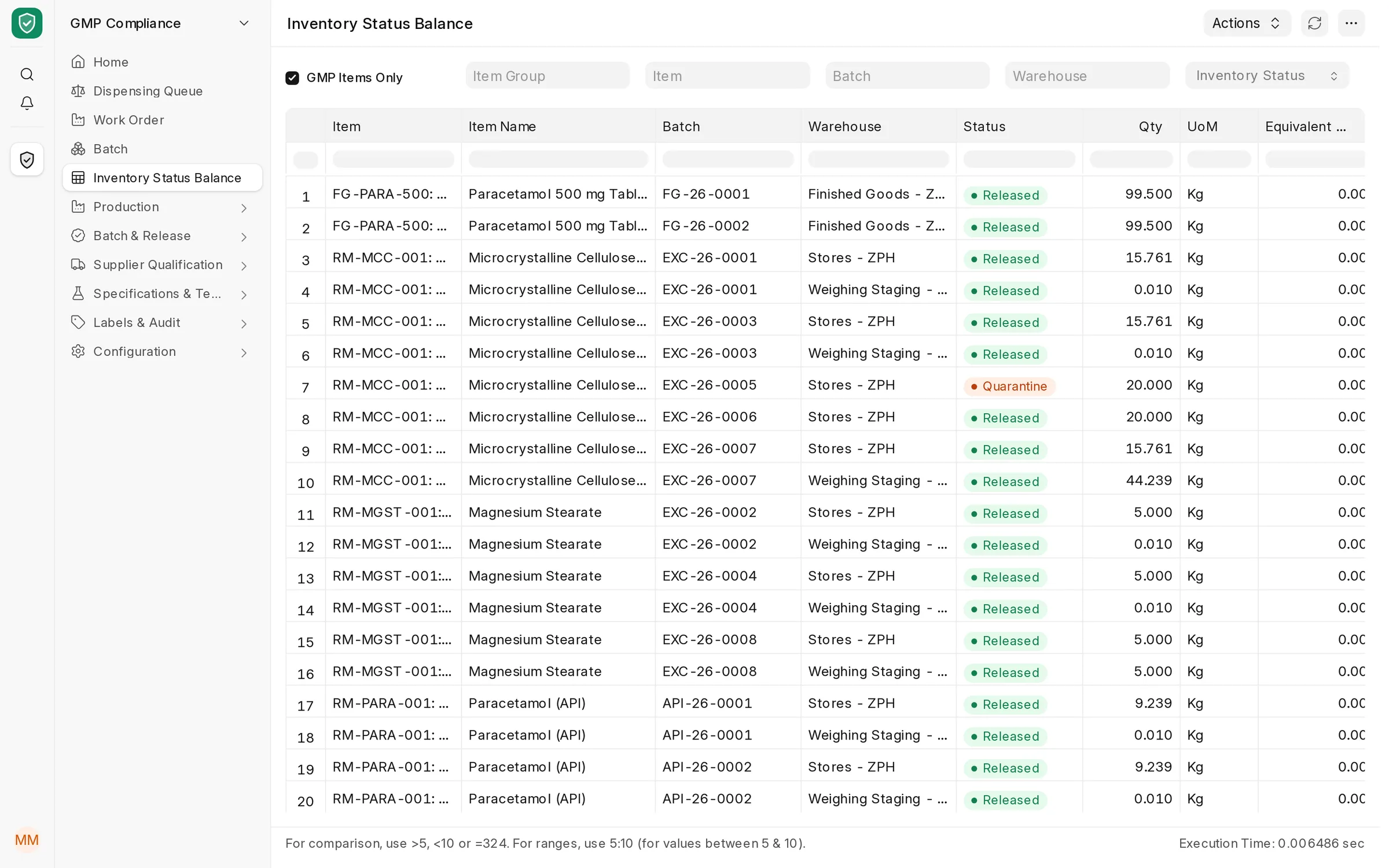
Inventory Status Balance report listing each batch by warehouse with its status: finished product and raw materials Released, one excipient lot still in Quarantine
Inventory Status Balance. One excipient lot is still in Quarantine; everything else on hand has been released. Released and quarantined quantities of the same batch are kept apart in every warehouse.
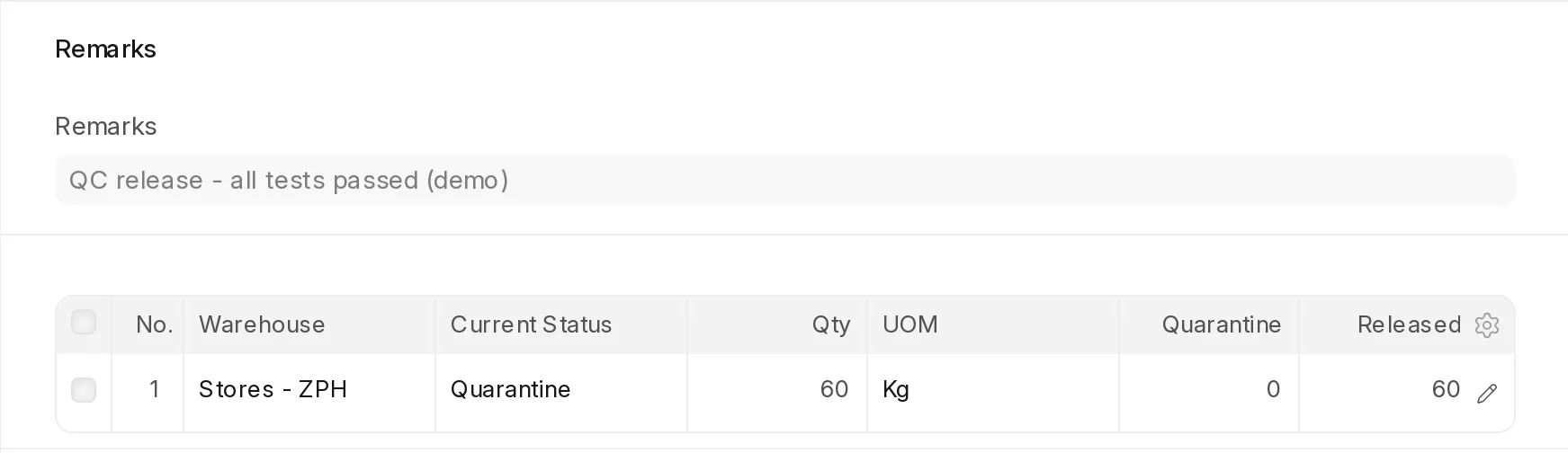
Inventory status change moving 60 kg of a raw-material batch in Stores from Quarantine to Released, with QC remarks
A signed release. 60 kg moved from Quarantine to Released in Stores. The change posts its own stock entry and prints the batch release labels.
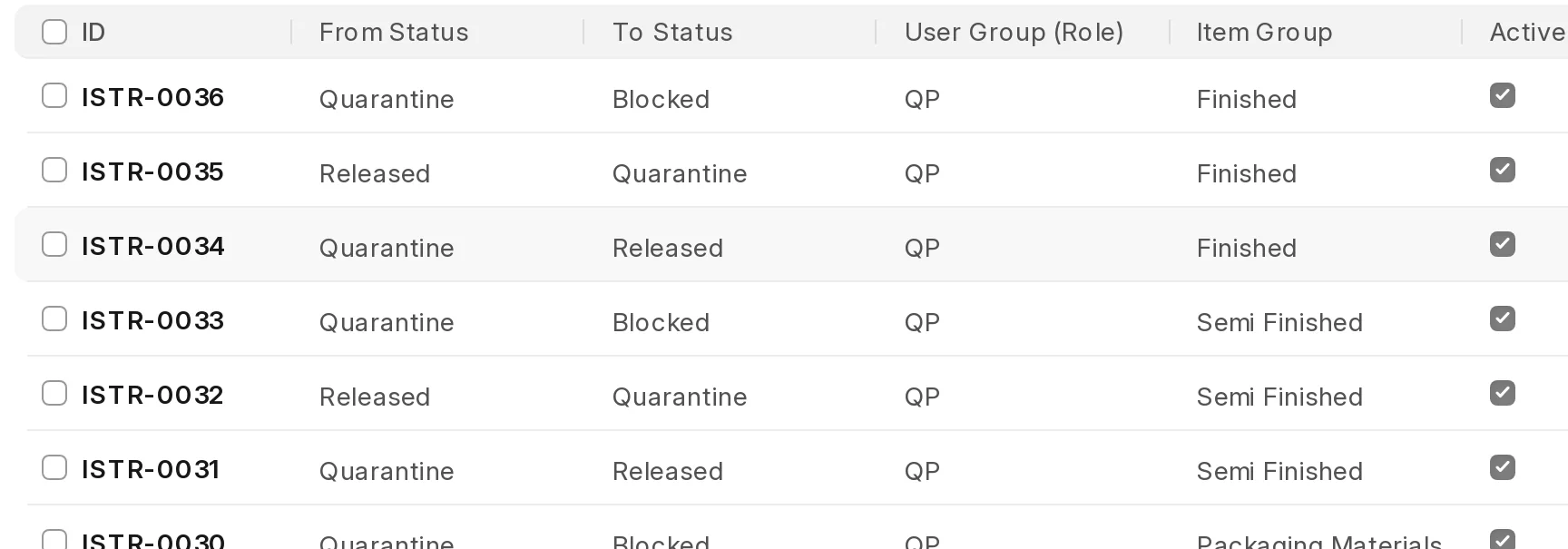
Inventory status transition rules: which role may move which item group from one status to another
Who may release what. Rules per item group and role. A weighing operator who tries to release a lot is refused and told which roles may do it.
Supplier qualification

An unapproved source cannot be ordered.

Qualification is held per supplier, item and manufacturer. When a source is blocked, the purchase order is refused at save, with a link to the record that blocks it.
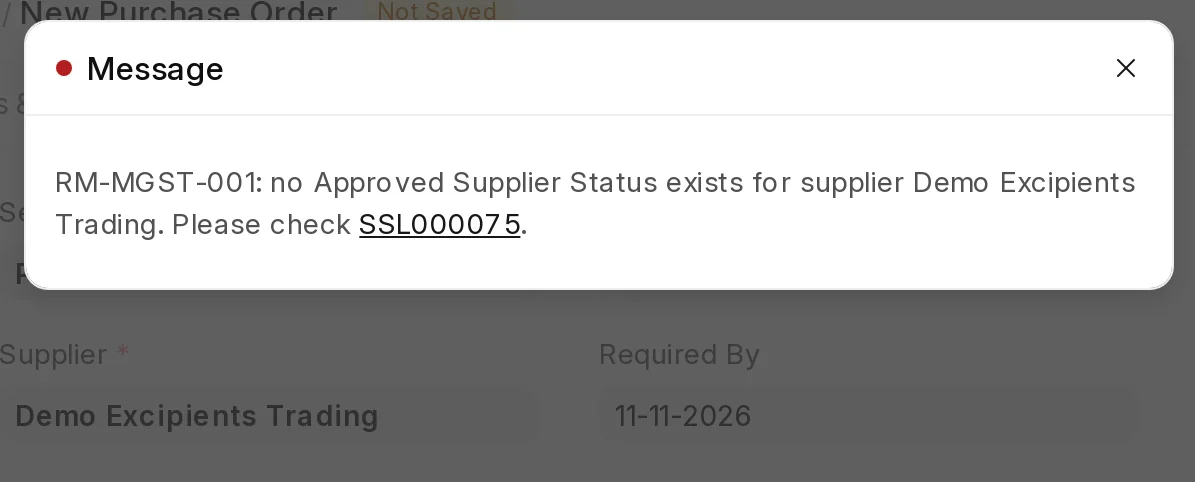
Purchase order refused: no approved supplier status exists for this supplier and item, with a link to the blocking record
Refused at the purchase order. The supplier's qualification for magnesium stearate was blocked after a failed audit, so the order cannot be saved.
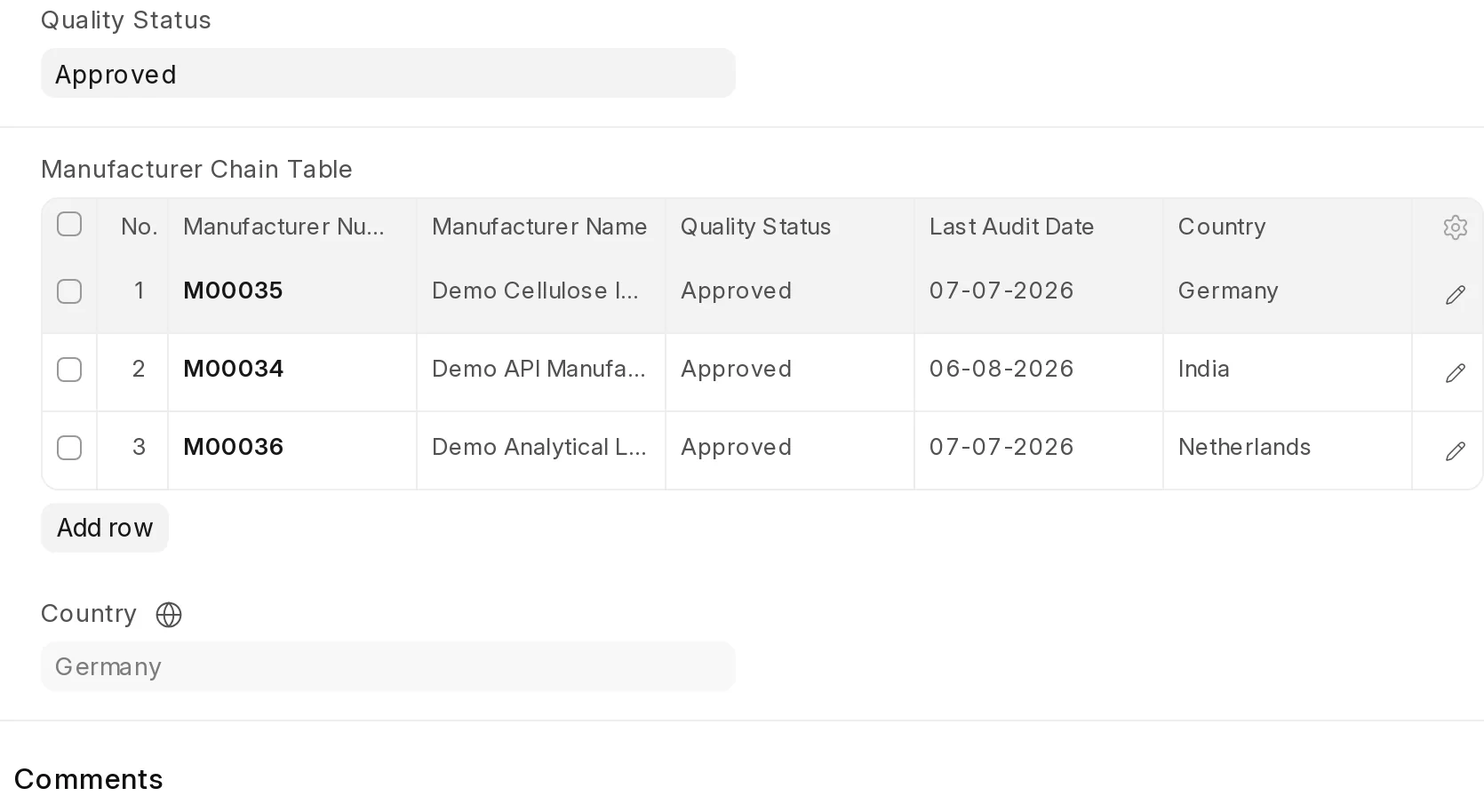
Manufacturer chain with three sites: intermediate manufacturer, final manufacturer and analytical laboratory, each with quality status and last audit date
Manufacturer chains. One source, three sites: intermediate, final manufacture and release testing. Each site's quality status and audit date update from its own record.
Assay adjustment

The API is dosed by potency, not by weight on the BOM.

When the selected API lot assays below 100%, the work order raises its quantity so the batch contains the intended amount of active ingredient. A nominated excipient is reduced by the same amount, so the batch weight stays on target.

  • Factorising is set per BOM line, and at most one excipient balances the batch
  • A factorised line needs a batch, and an API batch needs an assay, before the work order can be released
  • Non-factorised lines stay locked to the BOM total, even when split across several lots
Work order · 100 kg batchAPI lot at 98.5% assay
  1. Paracetamol (API): 50.000 → 50.761 kg50 × 100 ÷ 98.5
  2. Microcrystalline cellulose: 45.000 → 44.239 kgAbsorbs the 0.761 kg difference
  3. Magnesium stearate: 5.000 kgNot factorised, locked to the BOM

Batch weight stays at 100 kg. The figures come from the demo run shown below.
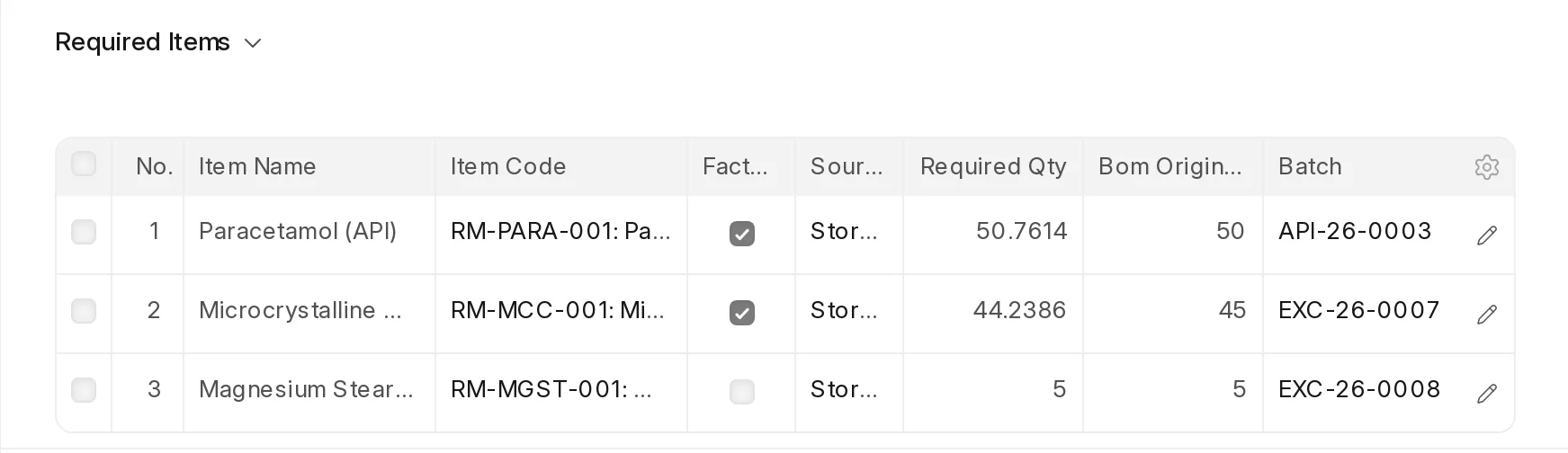
Work order required items: API and excipient marked as factorising, with required quantity adjusted from the BOM quantity and a planned batch on each line
The work order. Factorising lines marked, BOM quantity next to the adjusted requirement, and the planned lot on each line.
Dispensing and weighing

One queue for the weighing room. No job cards to chase.

The dispensing queue shows every released work order and where each of its materials is: in stores, in staging or in the weighing room. Material moved for one order is reserved for it, so another order cannot take it.
Stores
Released lotsPicked first-expiry-first-out, planned lot first
Weighing staging
Reserved for the orderPick list transfer
Weighing room
ScanWeighWithin toleranceLabel
Work in progress
Issued to the orderLeftover returns to staging
Each move is a stock entry that carries the batch's release status. Stock that is not Released cannot be issued to a work order.
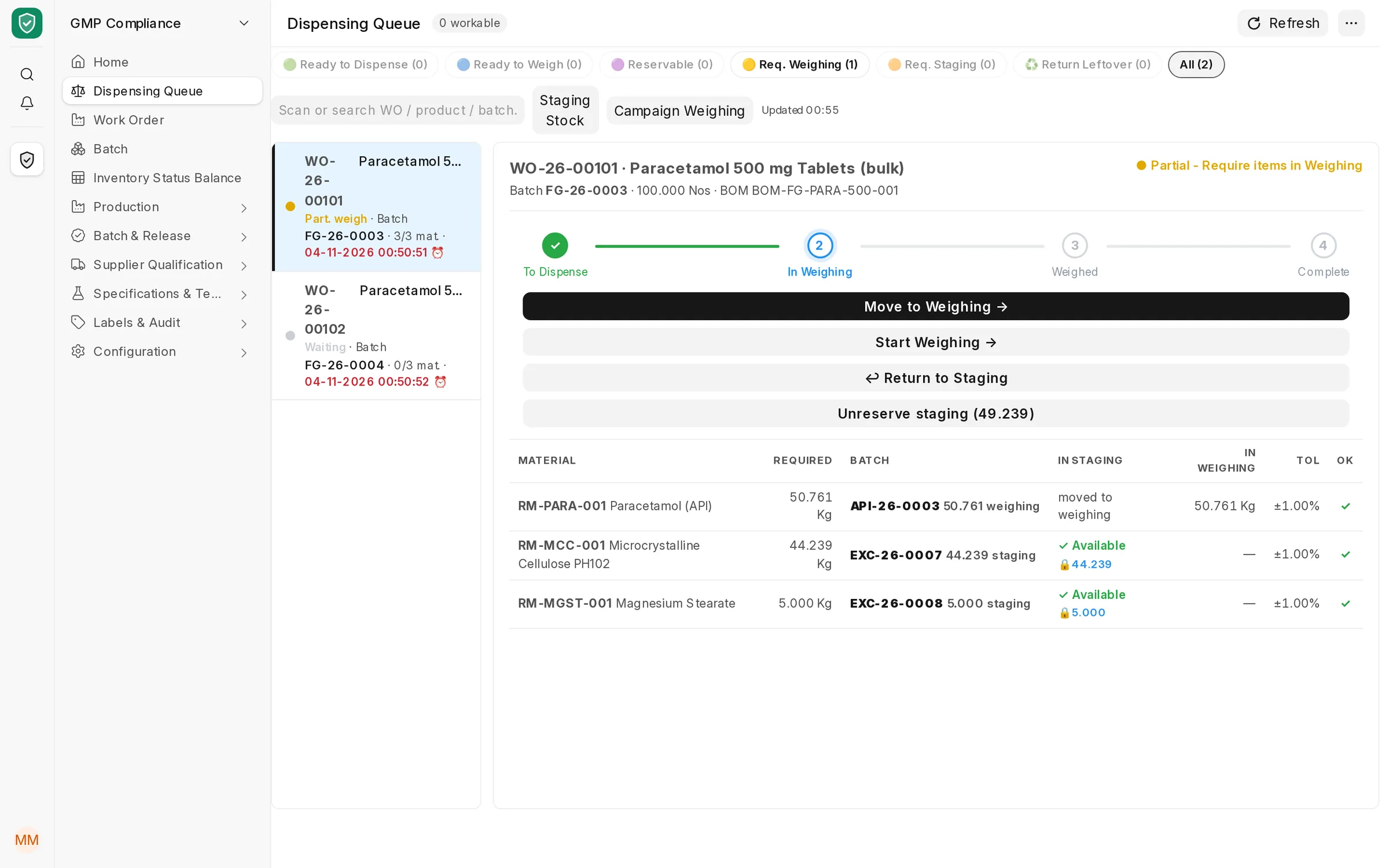
Dispensing queue: a work order with its stage tracker, and each material's batch, quantity in staging or weighing room, and tolerance
Dispensing queue. The API is in the weighing room; the two excipients are staged and reserved for this order. Each line shows its batch and weighing tolerance.
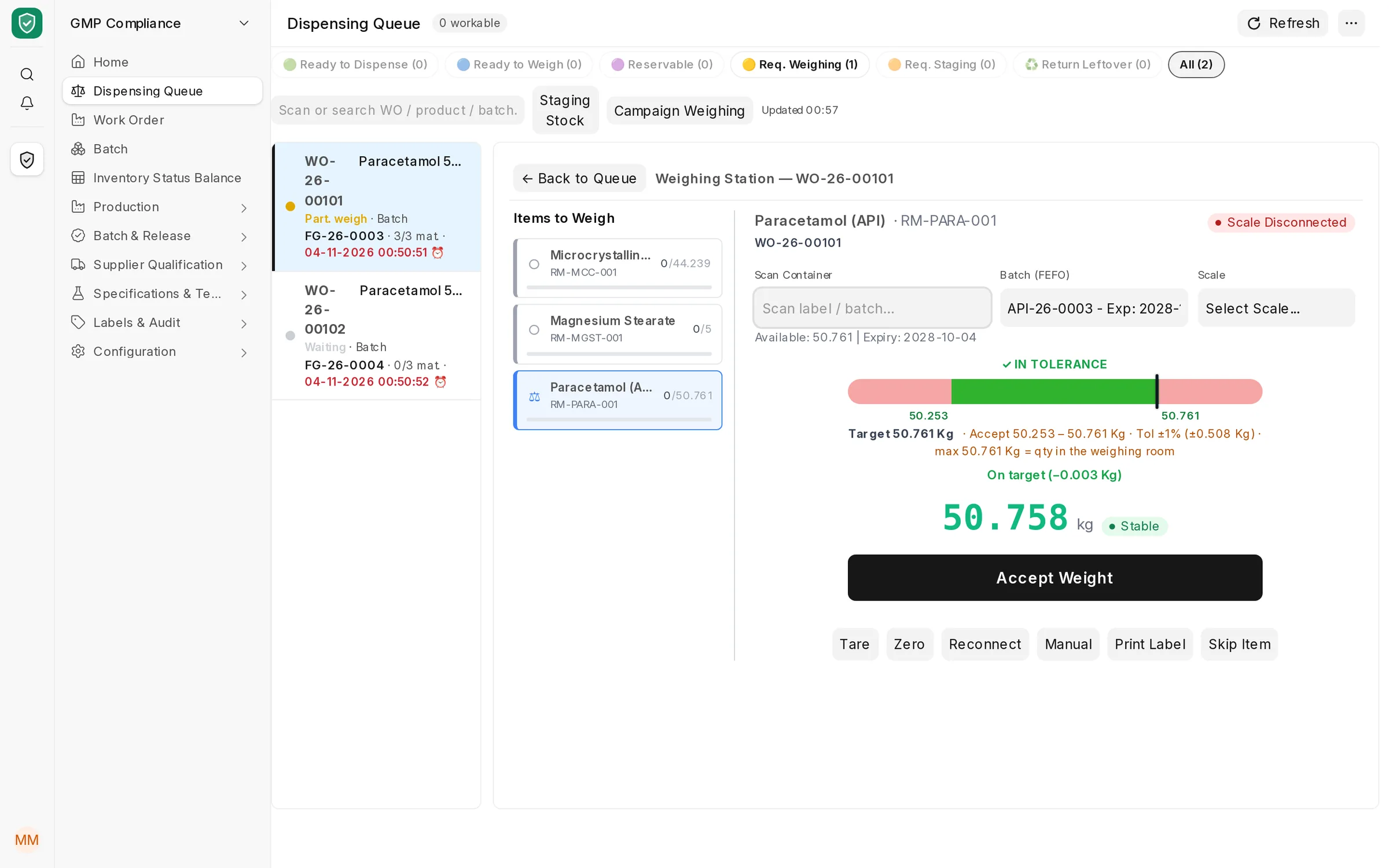
Weighing station: target, accepted range and tolerance bar for the API, with a reading inside tolerance and the Accept Weight button enabled
Weighing station. Target 50.761 kg, accepted range ±1%, capped at what is in the room. Accept Weight only enables inside the range, and posts the transfer to production. The reading here was entered for the demo; on site it comes from the connected scale.
Labels

Every label is a record, not just a printout.

Receipt, release, weighing, intermediate, sample and shipping labels are each numbered and logged. A QR code identifies the container or batch, and dispensing can check it.
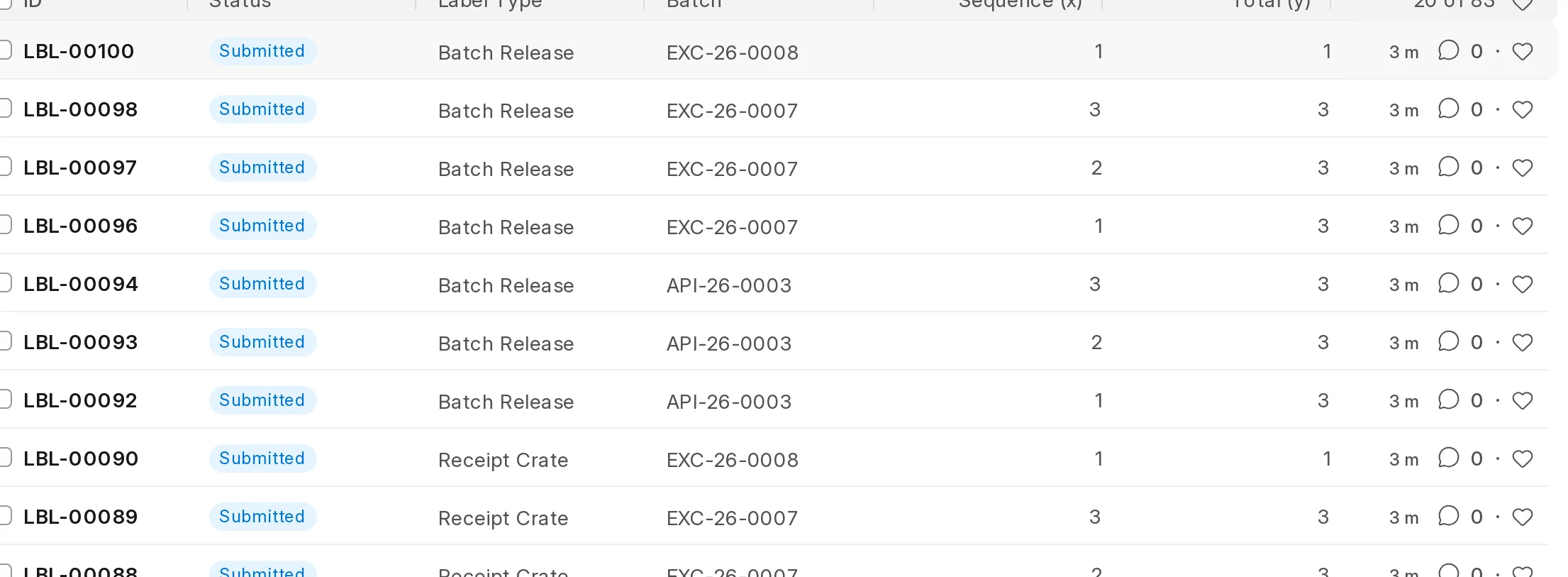
Numbered

Container 2 of 3.

Each container gets its own label and sequence, and the last one can be marked as the partial rest container.

Controlled

Reprints need a reason.

A reprint replaces the active set and records why. Cancelling the receipt or work order cancels its labels too.

Your layout

Your label designs.

Layouts are print formats, so each site keeps its own label design, language and fields.

Label print ledger listing receipt and batch release labels by batch with sequence numbers
Label print ledger. Receipt crate and batch release labels per lot, with each container's sequence number.
Data integrity

Signed, locked and traceable.

  • Release steps ask for the user's password again and write a signature log entry
  • At the weighing station, narcotic materials need a second operator with the approver role to sign first
  • A released BOM cannot be edited; batch dates change only through a status change with a reason
  • Qualifications past their validity are expired automatically, and retest-due batches return to Quarantine
  • Every document keeps ERPNext's full version history: who changed what, and when
For the QA team

The day's GMP work on one screen.

The GMP Compliance workspace opens on what needs attention: open work orders, batches waiting for release, lots close to expiry or retest, suppliers waiting for approval and signatures captured.
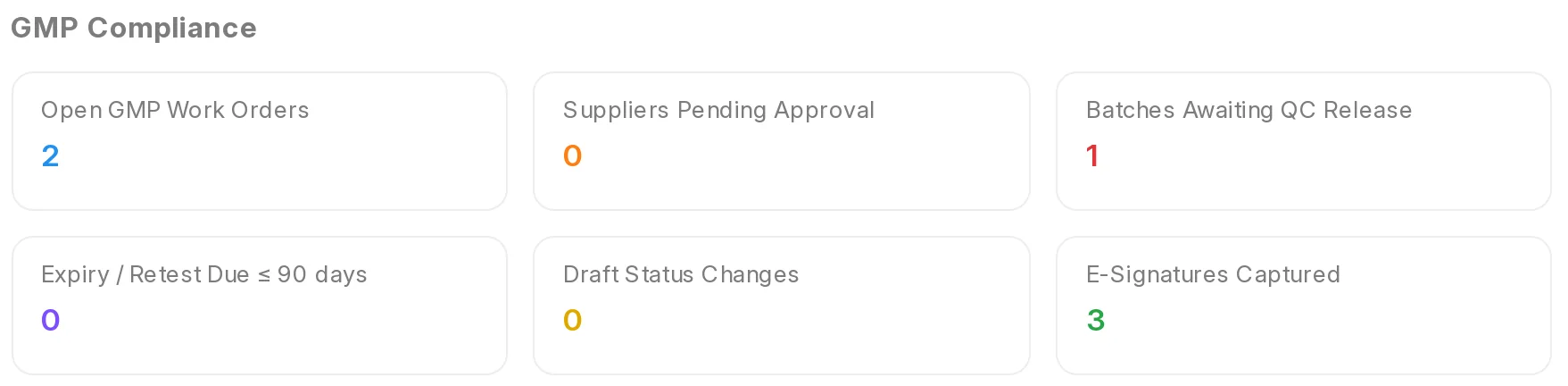
GMP Compliance workspace with counters for open work orders, suppliers pending approval, batches awaiting QC release, expiry or retest due, draft status changes and e-signatures

Screens from the product running on ERPNext v16 with demo data: company, suppliers, manufacturers and batches are fictional.

Bring us one product and its BOM. We will run a batch through release, dispensing and certification with you.