Skip to content
Talk to QCS
Home / Products / QCS Access Hub

Integration product · Live proof of concept

Any brand of access control. One integration.

Your CRM or property platform sends one request to add, change or remove a person or vehicle. Access Hub turns it into the right calls for whichever face terminal, card reader, number-plate camera or amenity controller each site runs, and records what every door system answered.

Working todayHikvisionSuprema BioStarZKTecoMEGVIIPaxtonANPR cameras
The problem

Every brand on site becomes a CRM project.

Communities mix brands and device types, and each has its own API, login, error codes and failure behaviour. Without a common layer, the CRM has to know all of them.

CRM calls each system directly
  • Vendor field mappings, logins and retry rules live in the CRM
  • A new site, brand or device model means a CRM change and test cycle
  • Device addresses and credentials are reachable from the integration network
  • Proof of what reached a door sits in each vendor's log, in each vendor's format
  • A slow or offline device blocks the CRM transaction that called it
CRM calls Access Hub
  • One request model, whatever the brand behind it
  • New sites, brands and device types are added inside the hub; the CRM is untouched
  • Only the hub is reachable, and device credentials never leave it
  • One record per request: what was sent, to which device, when, and the answer
  • The CRM gets Success, Partial or Failed at once; the hub repeats work in the background
How it fits

Brands plug in behind the hub. The interface never changes.

The request is defined by what you want to happen: a person or vehicle, an action, a validity period and a location. No vendor field ever reaches the CRM.

Sources
CRM or property platformPeople, units and vehicles
Resident appBookings and self-service
Visitor managementVisits and short stays
Credential portalsMobile credentials
QCS Access Hub
Check callerValidateResolve locationRecordRoute
Adapters, one per brand
HikvisionSuprema BioStarZKTecoMEGVIIPaxtonANPRYour next brand
Door systems, by device type
Face terminalsFace, NFC wallet, visitor QR
Card and mobile readersCard, mobile, face
Number-plate camerasVehicle plates at the gate
Amenity controllersQR access to gyms and pools
Any new device typeAdded as an adapter
Every connection uses HTTPS. Door systems decide access locally, so entry never depends on the hub.
In the product

Six brands, one request log. Every answer on record.

Operators see every request the hub has handled, which device record it was routed to and what came back, whatever the brand.
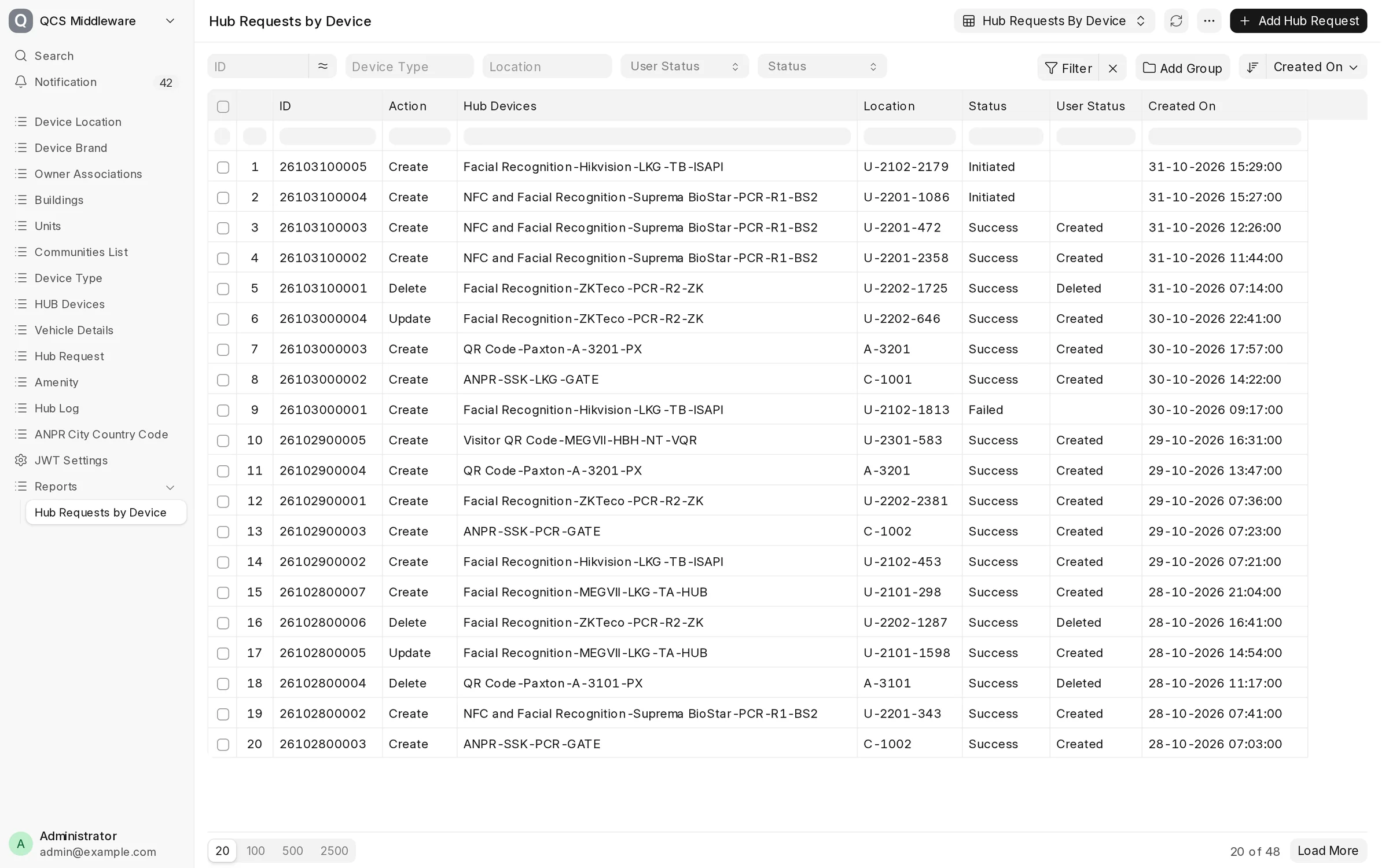
Hub Requests by Device report: create, update and delete requests routed to Hikvision, Suprema BioStar, ZKTeco, MEGVII, Paxton and SSK ANPR device records, with Initiated, Success and Failed statuses
Hub Requests by Device. Residents, visitors, vehicles and amenity bookings routed to Hikvision, Suprema BioStar, ZKTeco, MEGVII, Paxton and ANPR devices from the same request model.
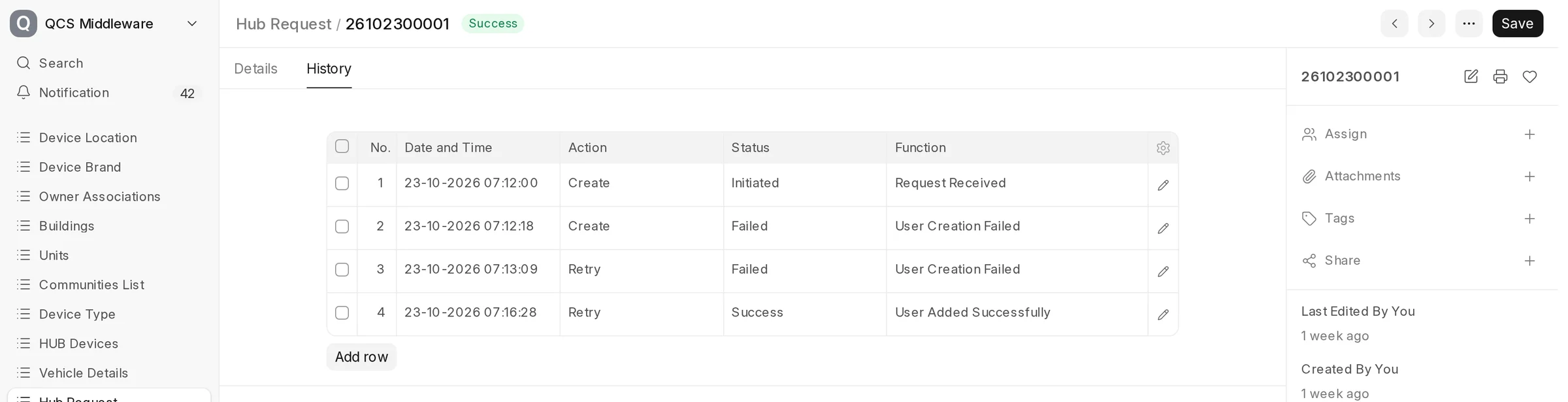
History tab of one hub request: received, two failed attempts while the device was unreachable, then added successfully on retry
One request's history. The device was unreachable twice; the hub retried and the resident was enrolled four minutes later, with no action from the CRM.

Screens from QCS Access Hub with demo data: sites, units and residents are fictional.

One request, end to end

What happens when the CRM adds a resident.

  1. 01

    One request

    Person, unit, photo and validity period. The same fields for every brand.

  2. 02

    Checked and resolved

    The caller's token is checked, required fields and dates validated, and the unit resolved to building and community.

  3. 03

    Routed by device record

    The building's device record names the brand. That brand's adapter makes the vendor calls, with a timeout on each.

  4. 04

    Answered and recorded

    Success, Partial or Failed goes back to the CRM, and every attempt is stored with the device's answer.

Hub request · exampleAdd resident · Tower B, unit 1203
  1. Caller checked and unit resolvedTower B · Lakeside community
  2. Routed to the building's face terminalsCreate sent to the vendor hub
  3. 5 of 6 terminals confirmedFace enrolled
  4. Partial: lobby terminal 3 offlineRepeated when it reconnects

Sending the same request again returns Success without duplicates.

Three outcomes, every brand
  • Success. Every device for the location confirmed the change.
  • Partial. Some devices are not yet updated, and the hub names them. Queued retries run every minute until they confirm.
  • Failed. Rejected with the reason, before any device is called if the data is wrong: unknown unit, missing field, dates out of order.

Every request carries a reference, so a repeated request is recognised and never creates a duplicate.

Brand and device agnostic

Growth happens inside the hub. The CRM does nothing.

The contract with the CRM only ever changes by adding optional fields, so a change at the door never forces a CRM release.

Change on siteWhat changes in the hubWhat the CRM does
New site on a brand already connectedA location and a device recordNothing
New device model of a connected brandDevice type and mapping in that adapterNothing
New brand or vendorA new adapter; the device record names the brandNothing
Move a site from one brand or platform to anotherThe site's device record points to the other adapter; people are re-enrolled from the hub's own recordsNothing
New credential typeThe adapter handles it; an optional field only if the data is newNothing, unless it sends the new field
Coverage

People, vehicles and amenities.

People

Residents to short stays.

Residents and tenants are enrolled on every device of their building. Visitors and short-term renters are enrolled at the start time on designated devices only, and removed at the end.

Vehicles

Plates at the gate.

Plate, category, city or country and validity. The hub maps the city to each camera system's code list, so the CRM never holds it.

Amenities

Booked, then checked.

A QR credential for the booking window. Shortly after the start, the hub checks the controller's events: used, or not used and revoked.

Security

Only the hub is reachable.

  • HTTPS on every connection
  • Each caller authenticates with its own token; the hub uses its own service account per door system
  • Device credentials and signing secrets in protected fields, never returned by an API or written to logs
  • Face photos passed through to the door system and stored privately
  • Failed and partial requests, queue age and device reachability reported to operators
Availability

A hub outage delays changes, not entry.

  • Doors decide locally and keep opening for everyone already enrolled
  • Every device call has its own timeout, so one slow brand never holds up another
  • Bulk onboarding runs on a separate queue and is paced, so devices are never flooded
  • Production design: active in two data centres with a cloud standby, replicated database and automatic failover

Tell us which brands are on your sites. We will show one request reaching them all.